
Guide
VLESS Reality on iPhone: what it is and when FollowNet uses it
VLESS Reality is a newer VPN transport designed to look like ordinary encrypted web traffic. FollowNet includes it alongside WireGuard, IKEv2, AmneziaWG and Hysteria2. This guide explains what it does differently, when it helps and why it is not always the fastest choice.
What VLESS Reality is
VLESS is a lightweight transport protocol; Reality is a technique that makes the connection resemble a normal TLS (HTTPS) session to a real website. For a network that inspects traffic patterns, the connection looks much like ordinary browsing rather than a typical VPN tunnel.
Why it exists
Some networks recognise and slow down classic VPN protocols such as WireGuard or IKEv2 — sometimes even modified ones. In those conditions a tunnel may show “Connected” yet pass little or no traffic. A transport that blends in with regular web traffic gives you another path when the usual ones stall.
How FollowNet uses it
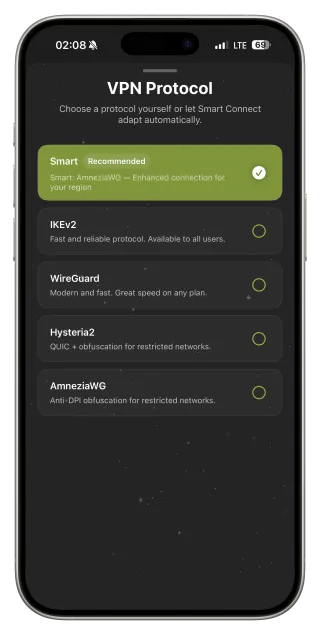
With Protocol on Smart, FollowNet uses network context and fallbacks to decide when VLESS Reality is worth trying. You can also select it manually in Settings → VPN Protocol, or apply the Restricted profile, which keeps Smart Connect’s full fallback ladder. FollowNet verifies that real traffic passes before treating a session as healthy.
When not to use it
On a calm home network VLESS Reality is rarely the fastest option — WireGuard usually wins on raw speed and latency. Use VLESS Reality when other protocols fail or perform poorly, not as a default everywhere. Its availability also depends on the servers that support it for your plan.
Check it actually helps
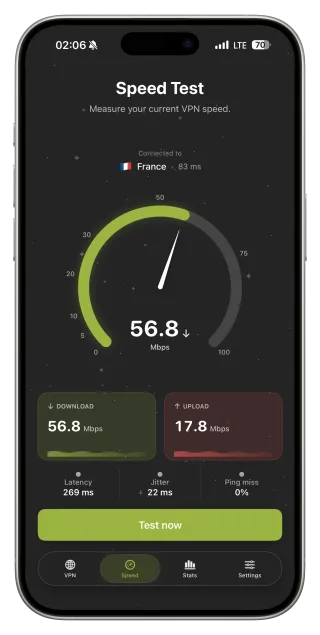
After switching, load a few real pages and run Speed Test rather than trusting the status colour alone. Compare with Smart and WireGuard on the same server. If VLESS Reality is clearly better on a particular network, save it in a custom Network Profile for that place.
Using VLESS Reality
- Keep Protocol on Smart and let FollowNet decide, or
- Apply the Restricted network profile for difficult networks, or
- Select VLESS Reality manually in Settings → VPN Protocol.
- Load real pages and run Speed Test to confirm it helps.
- Save a custom profile for networks where it works best.
Where VLESS Reality fits
| Protocol | Strength | Best used |
|---|---|---|
| WireGuard | Speed, low latency | Stable home and office networks |
| IKEv2 | Smooth reconnects | Switching Wi‑Fi and LTE |
| AmneziaWG | WireGuard with altered patterns | Networks that slow WireGuard |
| Hysteria2 | Copes with packet loss | Lossy or congested links |
| VLESS Reality | Resembles ordinary HTTPS | When other protocols stall |
Key points
- Designed to resemble ordinary encrypted web traffic
- Useful when classic protocols are slowed or stalled
- Smart Connect and the Restricted profile can use it automatically
- Not the fastest on calm networks — WireGuard usually is
- Always confirm with real page loads and Speed Test
FAQ
Is VLESS Reality more secure than WireGuard?
Both encrypt your traffic. VLESS Reality differs in how the connection looks on the network, not in being “more secure”.
Should I use it all the time?
No. Use Smart, and let VLESS Reality step in when other protocols struggle.
Is VLESS Reality available on Free?
Availability depends on the servers and your plan, as shown in the app.
Does it guarantee access everywhere?
No protocol can. It improves the odds on difficult networks and must be used in line with local laws.