
Guide
Split tunneling on iPhone — what iOS allows and what to use instead
Split tunneling means sending only some traffic through the VPN and the rest directly. On Windows and Android many apps let you exclude individual apps. On iPhone, consumer VPN apps work differently. This guide explains Apple’s limits honestly and shows which FollowNet tools solve the same tasks.
How a VPN works on iOS
On iPhone a consumer VPN creates a system tunnel: while connected, apps generally send their traffic through it. Per-app VPN exists in iOS, but it is designed for company-managed devices through MDM, not for App Store apps on personal phones. That is why honest iOS VPN apps do not offer an "exclude this app" list.
Why we do not promise per-app split tunneling
Some apps advertise split tunneling on iPhone, but in practice it is either limited to managed devices or works only for specific network ranges. We prefer to describe what really happens rather than show a switch that does not do what it says.
Network Profiles instead of exclusions
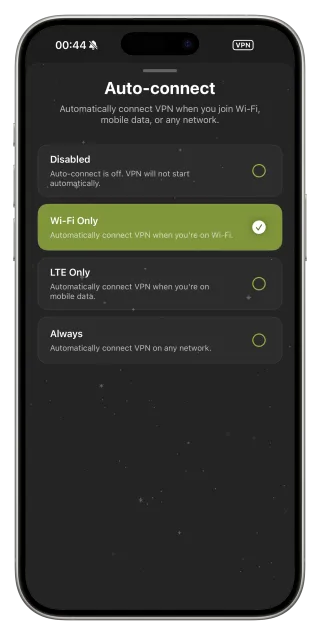
Most split-tunnel use cases are really "VPN in some places, not in others". Network Profiles and Auto-connect cover that: Wi‑Fi Only protects public hotspots while mobile data goes direct, and presets like Public Wi‑Fi and Travel tune behaviour for specific situations.
DNS settings for finer control
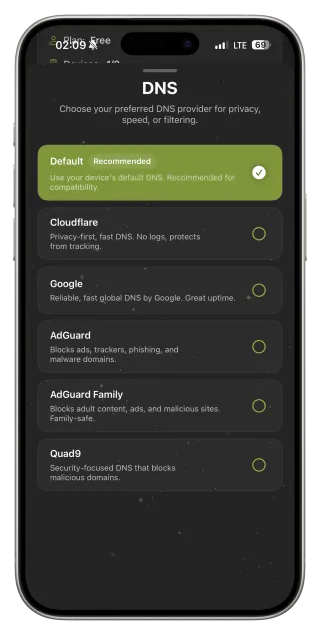
Sometimes the goal is not to route traffic differently but to change name resolution — for example, blocking ads or trackers. DNS presets in FollowNet — for example AdGuard for filtering — do that inside the tunnel without a separate app.
On a computer: route only the browser
If you need protection only for browsing on a Mac or PC, the FollowNet Chrome extension routes browser traffic while other apps on the computer go direct. It is the closest practical equivalent to split tunneling and uses the same account.
When an app does not work through the VPN
If a specific app — a bank, a local streaming service, a smart-home hub on your LAN — refuses to work while connected, the simplest option is to disconnect for that task or try a server in your own country. Shortcuts make switching quick: one tap to disconnect, one to reconnect.
Get split-tunnel results on iPhone
- Decide where you really need the VPN: hotspots, travel or everywhere.
- Set Auto-connect to Wi‑Fi Only if mobile data can go direct.
- Pick a Network Profile for the situation.
- Use a server in your country for apps that dislike foreign locations.
- Add Connect / Disconnect shortcuts for quick exceptions.
Task and the right tool
| Task | Per-app split tunnel | FollowNet tool |
|---|---|---|
| VPN only on public Wi‑Fi | Not needed | Auto-connect Wi‑Fi Only |
| Protect only the browser on a computer | Not needed | Chrome extension |
| App fails abroad-looking IP | Not on iOS | Server in your country |
| Quick exception for one task | Not on iOS | Disconnect shortcut |
Key points
- iOS consumer VPNs work as a system tunnel
- Per-app VPN on iPhone is for MDM-managed devices
- Auto-connect Wi‑Fi Only covers most split-tunnel needs
- The Chrome extension routes only browser traffic on a computer
- Shortcuts make quick exceptions easy
FAQ
Does FollowNet support split tunneling on iPhone?
Not per app — iOS reserves that for managed devices. Auto-connect rules, profiles and shortcuts solve most of the same tasks.
Can I exclude my bank app from the VPN?
Not individually. Use a server in your country or disconnect briefly with a shortcut.
Is there split tunneling on desktop?
The Chrome extension routes only the browser, so other apps on the computer go direct.
Why do some iPhone VPNs claim split tunneling?
It is usually limited to IP ranges or managed devices. Check what exactly is excluded before relying on it.