
Guide
How a VPN works on iPhone: tunnel, protocols, servers and DNS
A VPN looks like a single switch, but four things work together behind it: an encrypted tunnel, the protocol that builds it, the server where your traffic exits, and the DNS resolver that turns names into addresses. This guide walks through each one using FollowNet on iPhone as the example.
1. The tunnel
When you tap Connect, FollowNet asks iOS to start a Network Extension. The extension opens an encrypted connection to a VPN server and iOS sends device traffic into it. Every packet is encrypted on your iPhone, travels to the server, is decrypted there and continues to its destination. Replies take the same route back. To the café or hotel network, all of this looks like one encrypted stream to one address.
2. The protocol
The protocol decides how the tunnel is negotiated and how packets are wrapped. WireGuard is lightweight and fast on calm networks. IKEv2 is good at resuming the tunnel when you move between Wi‑Fi and LTE. AmneziaWG keeps WireGuard’s core but changes how the traffic looks; Hysteria2 runs over QUIC and copes with lossy links; VLESS Reality disguises the connection as ordinary HTTPS. Smart Connect chooses among them for you.
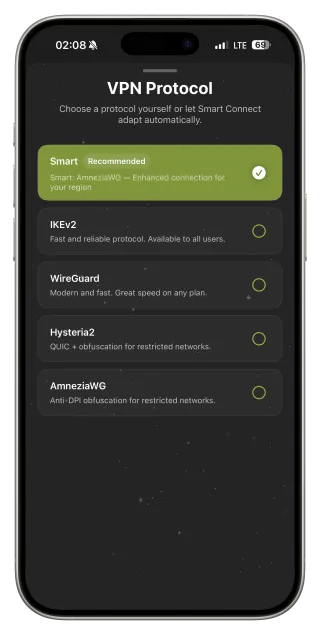
3. The server (exit point)
The server is where your traffic leaves the tunnel and enters the public internet. Websites see that server’s IP address and approximate location. A closer server usually means lower latency; a different country changes which regional version of some services you see. In FollowNet the server list shows ping for each location, and “Optimal location” picks a fast one automatically.
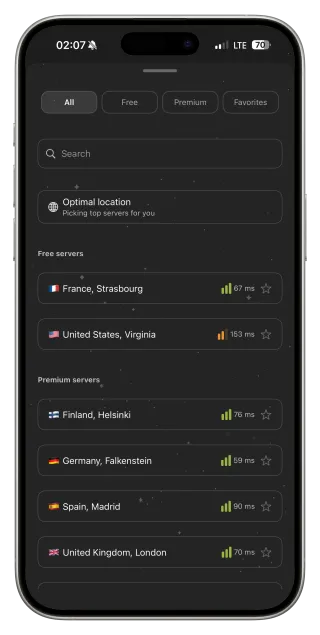
4. DNS
Before your iPhone can open a site it must translate the name (example.com) into an IP address. That lookup is DNS. While connected, FollowNet lets you choose who answers it: the default resolver, or presets such as Cloudflare, Google, Quad9 or AdGuard (which also blocks ad and tracker domains). DNS is separate from encryption — it decides who resolves names, not whether the tunnel is encrypted.
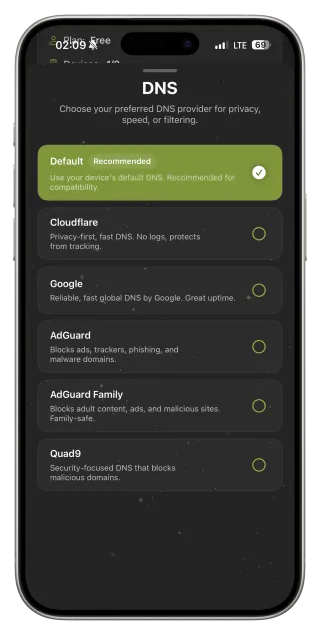
Putting it together: Smart Connect and profiles
Smart Connect handles the protocol layer: it starts with the option most likely to work on your network and climbs a fallback ladder if a handshake fails or traffic does not pass. Network Profiles bundle protocol, DNS, Auto-connect and server mode into one tap — for example Public Wi‑Fi (WireGuard, Quad9, Wi‑Fi only, fastest server) or Travel (IKEv2, Cloudflare, always on).
Where the protection ends
Encryption ends at the VPN server. From there your traffic travels like any other internet traffic, so HTTPS on the sites themselves still matters. The VPN also cannot work before you finish a hotel or airport login page — those captive portals need a direct connection first. And on a desktop computer, FollowNet’s Chrome extension is a browser proxy: it covers Chrome tabs, not every app on the computer.
See each layer for yourself
- Connect with Protocol set to Smart and note which protocol FollowNet reports.
- Open Speed Test and measure latency, download and upload on the current server.
- Switch to a server in another country and run Speed Test again — latency changes with distance.
- Change DNS to Quad9 or AdGuard in Settings and reload a few sites.
- Try the Public Wi‑Fi or Travel network profile to set all layers at once.
The four layers at a glance
| Layer | What it decides | Where to change it in FollowNet |
|---|---|---|
| Tunnel | Traffic is encrypted between iPhone and server | Connect button |
| Protocol | How the tunnel is built and how it looks on the network | Settings → VPN Protocol |
| Server | Where traffic exits and which IP sites see | Server list / Optimal location |
| DNS | Who translates site names into addresses | Settings → DNS |
Key points
- Tunnel, protocol, server and DNS are separate layers
- Smart Connect picks the protocol and falls back automatically
- Server choice affects latency and the IP websites see
- DNS presets change the resolver, not the encryption
- Network Profiles set all layers in one tap
FAQ
Can my internet provider see I use a VPN?
It can usually see that you are connected to a VPN server, but not what travels inside the tunnel. Protocols such as VLESS Reality make the connection look more like ordinary HTTPS.
Does the VPN encrypt traffic that is already HTTPS?
Yes, it wraps it in a second layer. HTTPS protects the content; the VPN additionally hides which sites you contact from the local network.
Why do some apps behave differently with a VPN?
Some services adjust content or security checks based on the server’s IP and location. Switching to a nearer server usually helps.
Is all traffic on my iPhone tunnelled?
While connected, iOS sends device traffic through the VPN. Some system services and local network traffic follow Apple’s own rules.