
Guide
What is a VPN? A plain-English guide for iPhone users
A VPN (virtual private network) encrypts the connection between your device and a VPN server, so the Wi‑Fi you are on and your internet provider see far less of what you do. Here is how it works, what it protects, what it does not — and how FollowNet does it on iPhone.
The short answer
Normally every app on your iPhone talks to the internet directly through whatever network you joined — a café hotspot, a hotel router, your mobile carrier. Anyone running that network can see which servers you contact and, for unencrypted traffic, what you send. A VPN wraps all of that traffic in an encrypted tunnel to a server you choose. The local network only sees encrypted data going to one VPN server; websites see the VPN server’s IP address instead of yours.
What a VPN actually protects
A VPN protects the path between your device and the VPN server. That matters most on networks you do not control: public Wi‑Fi in cafés, airports and hotels, guest networks at offices, and travel SIM cards. It hides which sites and apps you use from the network owner, stops simple snooping on shared hotspots, and makes it harder for a network to throttle or block specific services by inspecting your traffic.
What a VPN does not do
A VPN is not antivirus and it does not make you anonymous. If you sign in to Google, Instagram or your bank, those services still know it is you. It will not stop phishing links, fake login pages or malware you install yourself. Cookies, accounts and payment details can still identify you. Be wary of any VPN that promises “total anonymity” or “military-grade invisibility” — those are marketing words, not features.
How a VPN works on iPhone
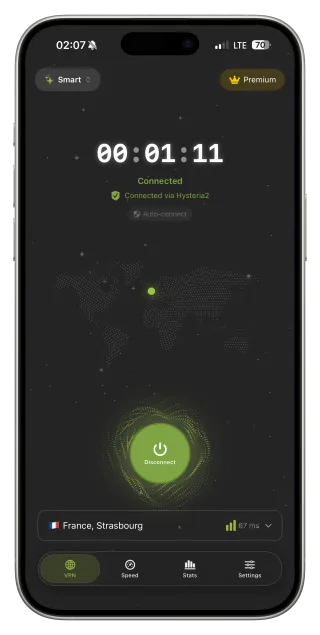
iOS has a built-in framework for VPN apps called Network Extension. When you install a VPN from the App Store and tap Connect, iOS asks once for permission to add a VPN configuration. After that, the app creates the tunnel and iOS routes device traffic through it — Safari, messengers, mail, every app. You will see the VPN icon in the status bar while it is active. FollowNet is built on this framework rather than on a downloaded configuration profile.
Protocols: the “language” of the tunnel
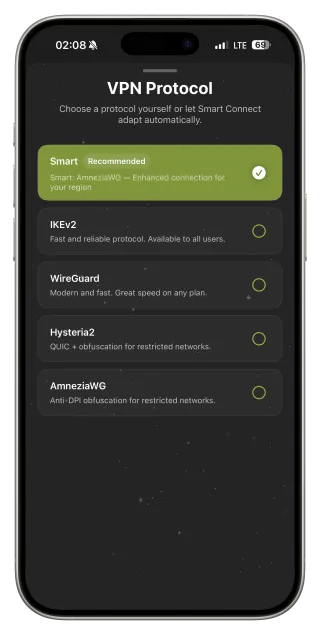
A VPN protocol defines how the encrypted tunnel is built. WireGuard is modern and fast; IKEv2 reconnects smoothly when you switch between Wi‑Fi and LTE; AmneziaWG, Hysteria2 and VLESS Reality help on networks that slow down or block ordinary VPN traffic. You do not need to learn them on day one: FollowNet’s Smart Connect picks a protocol for the network you are on and falls back to another one if it fails.
Do you need one?
If you regularly use public or guest Wi‑Fi, travel, work from cafés, or are on a network that filters services, a VPN is a sensible everyday tool. On a home network you control, the benefit is mostly privacy from your internet provider. A good way to decide is to try one on the networks you actually use: FollowNet Free includes weekly traffic without a credit card, so you can see whether it helps before paying.
Try a VPN on iPhone in five steps
- Install FollowNet from the App Store.
- Sign in with the code sent to your email — no password to create.
- Tap Connect and allow the VPN configuration when iOS asks (only the first time).
- Leave the protocol on Smart and check the VPN icon in the status bar.
- Open a few sites and apps, then run Speed Test to see your real-world speed.
Without a VPN vs with a VPN
| Without VPN | With VPN | |
|---|---|---|
| What the Wi‑Fi owner sees | Which servers and sites you contact | Encrypted traffic to one VPN server |
| What websites see | Your real IP address | The VPN server’s IP address |
| Protection on public Wi‑Fi | Depends on each site’s HTTPS | Whole path to the VPN server is encrypted |
| Login, cookies, accounts | Identify you | Still identify you |
| Phishing and malware | Not blocked | Not blocked by the VPN itself |
Key points
- A VPN encrypts the path from your device to the VPN server
- Most useful on public Wi‑Fi, travel networks and filtered networks
- Not antivirus and not anonymity — accounts still identify you
- On iPhone, App Store VPNs use Apple’s Network Extension framework
- FollowNet Free lets you test it with weekly traffic, no card required
FAQ
Is using a VPN legal?
In most countries using a VPN is legal, but rules differ. You are responsible for following local laws and the terms of the services you use.
Does a VPN slow down my iPhone?
Encryption and the extra distance to the server add some overhead. A nearby server and a modern protocol such as WireGuard usually keep the difference small; Speed Test shows the real numbers.
Does a VPN drain the battery?
A little. Keeping a tunnel open costs some energy, mostly on weak cellular signal. Modern protocols are efficient and you will rarely notice it in daily use.
Is a free VPN safe?
It depends on the provider. Read the privacy policy and check how the free tier is funded. FollowNet Free is a real VPN with a weekly traffic limit and a published Privacy Policy.