
Guide
Do I need a VPN on my iPhone? An honest checklist
You do not need a VPN for everything — but in a few common situations it is the simplest protection you can add. This checklist helps you decide based on how you actually use your phone, without fear marketing.
When a VPN clearly helps
Public and guest Wi‑Fi is the classic case: cafés, airports, hotels, coworking spaces and conference networks are shared with strangers and run by people you do not know. A VPN encrypts everything between your iPhone and the VPN server, so the hotspot cannot see which services you use. It also helps on travel SIMs and on networks that slow down or filter certain services.
When it helps a little
At home on your own router, a VPN mainly adds privacy from your internet provider, which otherwise sees the domains you visit. If you share your home network with guests or flatmates, that is another reason. Remote workers who join different networks during the day benefit from keeping one consistent, encrypted path.
When a VPN will not solve the problem
A VPN does not stop phishing emails, scam sites, weak passwords or malware. It does not make you anonymous to services you are logged in to. It will not guarantee access to every streaming catalogue, and it is not a replacement for a corporate VPN if your employer requires one. If those are your concerns, start with updates, a password manager and two-factor authentication.
A simple way to decide
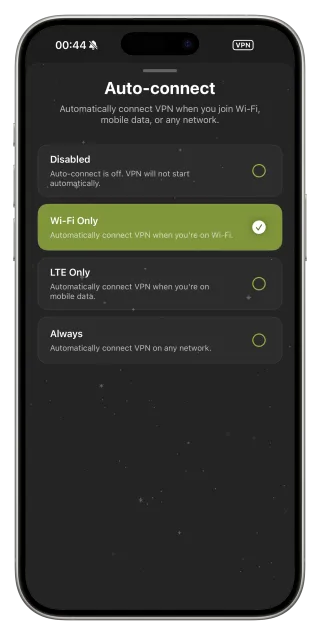
Think about the last week. If you joined at least one network you do not control, a VPN is worth having ready. Set it up so you do not have to remember: FollowNet’s Auto-connect can start the VPN automatically whenever you join Wi‑Fi, while leaving your mobile data alone — or always, on every network.
Free or paid?
Try before you pay. FollowNet Free is a real VPN with a weekly traffic allowance, the same protocols and Smart Connect, no credit card required. Premium removes the weekly limit, opens Premium locations and covers up to five devices. If Free covers your café and travel sessions, you may never need more.
Set up a “don’t think about it” VPN
- Install FollowNet and sign in with an email code.
- Connect once and allow the iOS VPN configuration.
- Open Settings → Auto-connect and choose Wi‑Fi Only (or Always).
- Keep Protocol on Smart so difficult networks are handled for you.
- Check the Statistics screen after a week to see how much traffic you really use.
Your situation and whether a VPN helps
| Situation | VPN helps? | Why |
|---|---|---|
| Café, airport or hotel Wi‑Fi | Yes, strongly | Shared network run by strangers |
| Travel SIM or roaming | Yes | Unknown network, sometimes filtered |
| Home Wi‑Fi you control | Somewhat | Privacy from your internet provider |
| Phishing or scam links | No | Needs caution and security tools, not a tunnel |
| Employer requires its VPN | Use theirs | Company policy comes first |
Key points
- Most valuable on Wi‑Fi you do not control and when travelling
- Adds privacy from your internet provider at home
- Does not replace updates, passwords or caution with links
- Auto-connect makes protection automatic on Wi‑Fi
- Free weekly traffic lets you decide before paying
FAQ
Do I need a VPN on mobile data?
Mobile networks are generally safer than open Wi‑Fi. A VPN on LTE mainly adds privacy from the carrier and helps on filtered or roaming networks.
Should I keep the VPN on all the time?
You can. Auto-connect “Always” keeps it on everywhere; “Wi‑Fi Only” is a good balance if you mostly care about hotspots.
Does iCloud Private Relay replace a VPN?
Private Relay covers Safari and some traffic only. A VPN covers all apps on the device and lets you choose the server location.
Will a VPN protect my bank app?
It encrypts the path on untrusted networks, which is useful. Banking security itself still depends on the bank’s app, HTTPS and your device security.