
Guide
Free VPN vs paid VPN: what you really get (and give up)
“Free” VPNs range from honest limited plans to apps that sell your data. Paid plans are not automatically better either. Here is what actually differs, what to check before trusting either, and how FollowNet’s Free and Premium compare.
How free VPNs pay their bills
Running servers costs money, so every free VPN is funded somehow. Honest models are a limited free tier that encourages upgrades, or advertising inside the app. Problematic models sell browsing data, inject ads into traffic or bundle tracking SDKs. The privacy policy and the app’s privacy label on the App Store usually tell you which kind you are looking at.
Typical limits of free plans
Expect a data cap (daily, weekly or monthly), fewer server locations, slower or busier servers, ads, or a time limit per session. None of these is a problem by itself — they become a problem when they are hidden. A good free plan shows its limit clearly so you can see when you are close to it.
FollowNet Free in practice
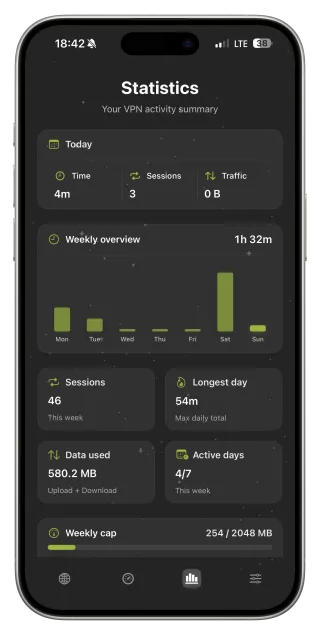
FollowNet Free is the same app with the same protocols, Smart Connect, DNS presets and Auto-connect. The difference is a weekly traffic allowance and the Free set of locations. The Statistics screen shows how much you have used and how much is left this week, and the allowance resets weekly rather than daily.
What Premium adds
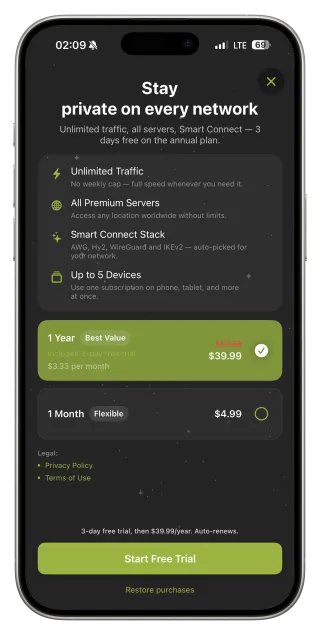
Premium removes the weekly limit, unlocks Premium locations, lets you use one subscription on up to five devices and removes ads. It is bought through the App Store as a monthly or annual subscription; the annual plan includes a short free trial shown on Apple’s payment sheet. Encryption is the same on both plans — you pay for capacity and choice, not for “stronger security”.
Red flags in any VPN, free or paid
Be careful with apps that have no clear company or privacy policy, promise “100% anonymity”, show fake countdown timers or claim thousands of servers in every country. Also check what happens when you cancel: subscriptions bought through the App Store can be managed and cancelled in your Apple ID settings at any time.
How to decide in one week
- Use FollowNet Free on the networks you actually join — café, office, travel.
- Check the Statistics screen at the end of the week.
- If you stayed within the allowance and the Free locations worked, stay on Free.
- If you hit the limit or need a specific Premium location, consider Premium.
- Start with the monthly plan if you are unsure; switch to annual later.
FollowNet Free vs Premium
| Free | Premium | |
|---|---|---|
| Traffic | Weekly allowance shown in the app | Unlimited |
| Locations | Free locations | Free + Premium locations |
| Protocols and Smart Connect | Included | Included |
| DNS presets, Auto-connect, Speed Test | Included | Included |
| Devices | Your devices with the Free allowance | Up to 5 devices |
| Ads | May be shown in some regions | No ads |
Key points
- Every free VPN is funded somehow — check how
- A good free plan shows its limits openly
- FollowNet Free: same protocols, weekly traffic allowance
- Premium: unlimited traffic, more locations, up to five devices
- Encryption does not depend on the plan
FAQ
Is FollowNet Free really free?
Yes. No card is required. You get a weekly traffic allowance; Premium is optional.
Is a paid VPN more secure than a free one?
Not automatically. Security depends on the protocols and the provider’s practices. In FollowNet both plans use the same encryption.
Can I cancel Premium any time?
Yes. Subscriptions are managed through your Apple ID; cancel before renewal and you keep access until the end of the paid period.
Does one Premium subscription cover my iPad?
Yes, Premium covers up to five devices signed in to the same account, including the Chrome extension.