
Guide
FollowNet Premium: unlimited traffic, more locations, five devices
Premium is for people who use a VPN every day. It removes the weekly Free limit, unlocks Premium locations, covers up to five devices and removes ads. Here is exactly what changes, what stays the same and how billing works.
What Premium adds
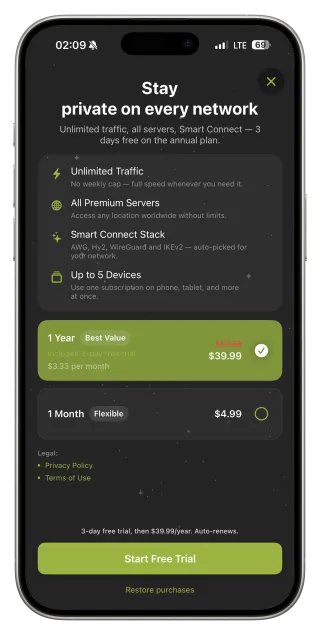
Unlimited traffic with no weekly cap, access to all Premium server locations, one subscription for up to five devices — iPhone, iPad and the Chrome extension — and no ads. Everything else you already know from Free stays exactly the same.
What does not change
Encryption, protocols and Smart Connect are identical on Free and Premium. Premium is about capacity and choice, not “stronger security”. If someone tells you a paid plan uses “double military encryption”, that is marketing.
Plans and billing
Premium is sold through the App Store as a monthly or an annual subscription; the annual plan works out cheaper per month and includes a short free trial shown on Apple’s payment sheet. Apple handles the payment, and you can manage or cancel the subscription at any time in your Apple ID settings.
Using Premium on several devices
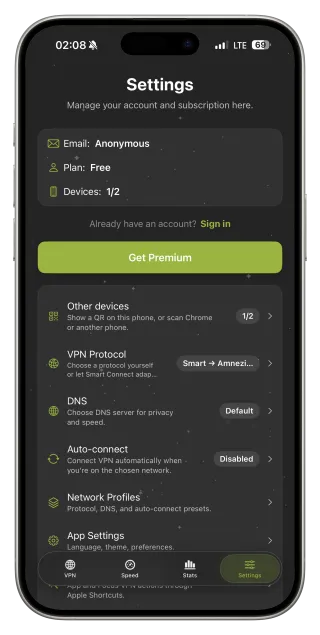
Sign in with the same email on your iPad and in the Chrome extension, or link a device by scanning a QR code from Settings → Other devices. Up to five devices share one subscription. On a new iPhone, use Restore Purchases to reactivate Premium.
Who should upgrade
Upgrade if you regularly hit the weekly limit, stream on the go, work remotely over public Wi‑Fi, need a specific Premium location, or want one plan for the whole family’s devices. If Free covers your occasional café sessions, there is no need to pay.
What Premium cannot promise
No VPN can guarantee access to every streaming catalogue or override local laws. Premium gives you more capacity and locations; how specific services behave remains up to them.
Upgrading and moving devices
- In the FollowNet iOS app, open the Premium screen.
- Choose monthly or annual and confirm with Apple Pay / Apple ID.
- Sign in to iPad or Chrome with the same email, or scan the QR code.
- On a new iPhone, tap Restore Purchases.
- Manage or cancel any time in your Apple ID subscriptions.
Free vs Premium
| Free | Premium | |
|---|---|---|
| Traffic | Weekly allowance | Unlimited |
| Locations | Free locations | Free + Premium locations |
| Devices | With Free allowance | Up to 5 on one subscription |
| Protocols, Smart Connect, DNS | Included | Included |
| Ads | May appear in some regions | None |
| Billing | — | Monthly or annual via App Store |
Key points
- Unlimited traffic and all Premium locations
- Up to five devices on one subscription
- No ads
- Same encryption and protocols as Free
- Billed and cancellable through the App Store
FAQ
Can I try Premium before paying?
The annual plan includes a short free trial, shown on Apple’s payment sheet before you confirm.
How do I cancel?
In iOS Settings → your name → Subscriptions. You keep Premium until the end of the paid period.
Does Premium work in the Chrome extension?
Yes, sign in with the same account. Chrome counts as one of the five devices.
Will Premium make my VPN faster?
Encryption is the same, but more locations can mean a closer or less busy server.