
Guide
FollowNet Free weekly traffic: how the limit works
FollowNet Free is a full VPN with one honest limit: a weekly traffic allowance shown in the app. Here is what counts toward it, when it resets, how to make it last and what happens when you reach it.
Weekly, not daily
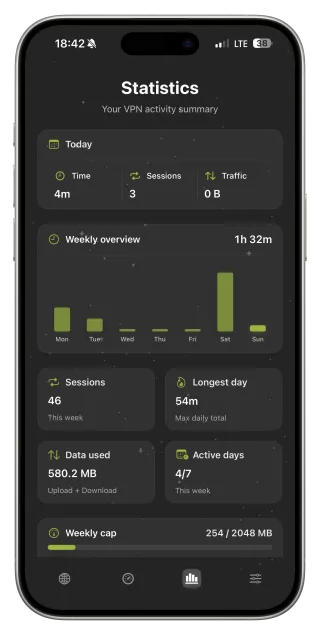
Free traffic is counted per week, which suits real life better than a daily cap: a heavy travel day can use more, a quiet day less. The current allowance and how much you have used are shown in the app. Exact figures can change with plan settings, so the in-app meter is always the source of truth.
What counts
All traffic that goes through the VPN tunnel counts — browsing, video, music, app updates, cloud backups and the built-in Speed Test. Traffic while the VPN is off does not count. Smart Connect’s connection checks are tiny but real.
Making it last
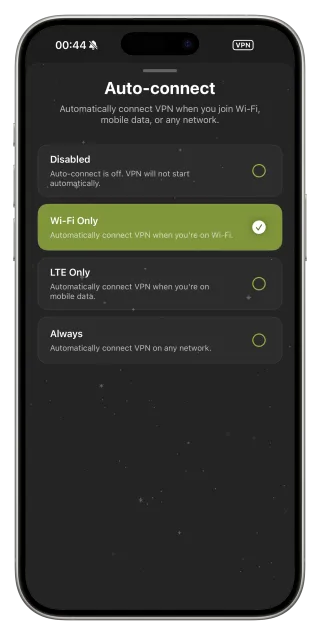
Video is the biggest consumer, so download films and series over a trusted network before travelling. Use Auto-connect Wi‑Fi Only so the VPN runs on hotspots, where it matters most, but not on mobile data at home. Pause iCloud Photos uploads and large app updates while on the VPN, and run Speed Test only when you need it.
What is included on Free
Free is not a stripped-down demo. You get the same protocols, Smart Connect, DNS presets, Network Profiles, Auto-connect, widgets and Speed Test as Premium, plus the Free set of locations. The weekly meter is the main difference.
When you reach the limit
New connections pause until the weekly reset, and widgets show that the quota is used instead of a misleading “Connected”. You can wait for the reset or upgrade to Premium for unlimited traffic, more locations and up to five devices.
Keep track of your allowance
- Open the Statistics screen to see used and remaining traffic.
- Set Auto-connect to Wi‑Fi Only.
- Download videos and large files before you travel.
- Avoid repeated Speed Tests.
- Upgrade to Premium if you regularly hit the limit.
What uses the most traffic
| Activity | Traffic use | Tip |
|---|---|---|
| HD video streaming | Very high | Download in advance |
| Video calls | High | Prefer audio-only when possible |
| App updates and backups | High, in bursts | Run them on trusted Wi‑Fi without VPN |
| Music streaming | Moderate | Download playlists |
| Browsing, email, messaging | Low | Ideal for Free |
Key points
- A weekly allowance, shown in the app
- All tunnelled traffic counts, including Speed Test
- Same features as Premium apart from the meter and locations
- Video uses the most; browsing and messaging very little
- Premium removes the limit and adds locations and devices
FAQ
How much traffic does Free include?
The current weekly allowance is shown in the app. It can change with plan settings, so check the Statistics screen.
When does the allowance reset?
Weekly. The app shows your current usage for the week.
Does traffic without the VPN count?
No. Only traffic through the FollowNet tunnel counts.
Can I add more traffic without subscribing?
Premium is the way to remove the limit; it is available monthly or annually.