
Guide
VPN and iPhone battery — what really drains power and how to save it
A VPN does cost some battery, but usually far less than people think. The real drain comes from the radio, weak signal and networks that keep breaking the tunnel. This guide shows how to measure the impact on your own iPhone and set up FollowNet so protection costs as little power as possible.
Where the energy actually goes
Encryption on modern iPhone chips is cheap. What costs power is keeping the Wi‑Fi or cellular radio active, re-establishing the tunnel after drops and retrying on lossy networks. A stable WireGuard session on good home Wi‑Fi barely shows up in battery stats; the same phone on a weak LTE signal on a train will drain faster with or without a VPN.
Check Battery settings before blaming the VPN
Open Settings → Battery and look at the last 24 hours and 10 days. iOS often lists VPN usage under the system or the app that triggered it. Compare a day with the VPN on and a similar day without it, on the same routes. One unusual day with poor signal says more about the network than about the tunnel.
Auto-connect: protect hotspots, not every minute
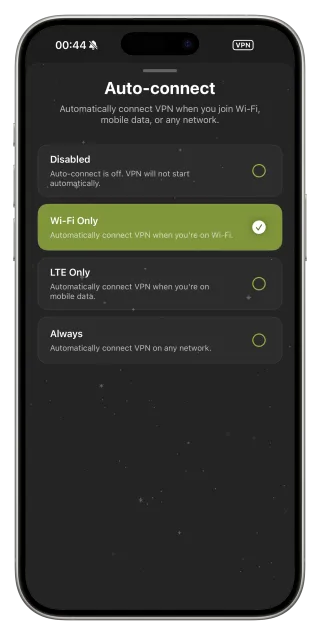
If you mainly need protection in cafés, hotels and airports, set Auto-connect to Wi‑Fi Only. The VPN then switches on for untrusted hotspots and stays off on mobile data, where the radio is already the biggest consumer. Keep always-on mode for situations where you really need the tunnel everywhere.
Pick the protocol that fits the network
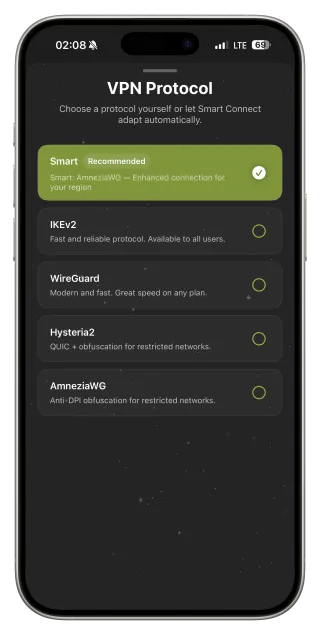
On calm networks WireGuard is the lightest choice: short handshakes, small overhead and quick recovery after sleep. On networks that interfere with VPN traffic, a tunnel that keeps reconnecting wastes far more energy than a slightly heavier protocol that stays up. Smart Connect picks a working option for the current network so the phone does not burn power on endless retries.
Distance and signal matter more than encryption
A far-away server means longer sessions for the same download, and the radio stays awake longer. Choose Optimal location or a nearby server with low ping. On a weak cellular signal every packet costs more energy; if you are on a trusted network with poor reception, switching the VPN off is a reasonable trade-off.
Low Power Mode and background rules
Low Power Mode limits background activity, but iOS keeps an active VPN tunnel running. If you need to stretch the last 10–20 %, disconnect on trusted networks and reconnect when you join public Wi‑Fi. FollowNet does not keep extra background tasks alive to pad statistics.
Battery-friendly setup in five minutes
- Check Settings → Battery to see your real baseline.
- Set Auto-connect to Wi‑Fi Only if you mainly need hotspot protection.
- Leave Protocol on Smart, or lock WireGuard on trusted home Wi‑Fi.
- Use Optimal location or the nearest low-ping server.
- On weak signal and trusted networks, disconnect instead of fighting the radio.
Typical scenarios and their battery cost
| Scenario | Battery impact | What to do |
|---|---|---|
| Home Wi‑Fi, WireGuard, nearby server | Minimal | Keep as is |
| Café Wi‑Fi with Auto-connect Wi‑Fi Only | Low | Recommended default |
| Always-on over weak LTE | Noticeable | Use Wi‑Fi Only or disconnect on trusted networks |
| Network that keeps dropping the tunnel | High | Use Smart Connect or another protocol |
Key points
- Encryption is cheap; the radio and weak signal are expensive
- Wi‑Fi Only Auto-connect covers hotspots without draining mobile data
- WireGuard is the lightest protocol on stable networks
- Reconnect loops cost more than any protocol choice
- Compare battery stats over several similar days
FAQ
Does a VPN drain the iPhone battery?
A little. On stable Wi‑Fi with a nearby server the difference is usually small; weak signal and constant reconnects increase it.
Which protocol uses the least battery?
On stable networks WireGuard. On networks that interfere with VPNs, the most efficient option is the one that stays connected, which is what Smart Connect looks for.
Should I keep the VPN on all the time?
Only if you need it everywhere. For café and hotel protection, Auto-connect Wi‑Fi Only is a good balance.
Does the VPN work in Low Power Mode?
Yes. iOS keeps the tunnel running; Low Power Mode only limits other background activity.