
Guide
VPN slow on iPhone? How to find the cause and speed it up
Some slowdown with a VPN is normal; a lot of it is not. The trick is to measure before changing anything. This guide shows how to find out whether the network, the server or the protocol is the bottleneck — and what to do in each case.
Measure first
Disconnect the VPN and run a speed test to get your baseline. Then connect FollowNet and run its built-in Speed Test on the same network. Compare download, upload, latency and jitter. If the baseline is already slow, the network is the problem, not the VPN.
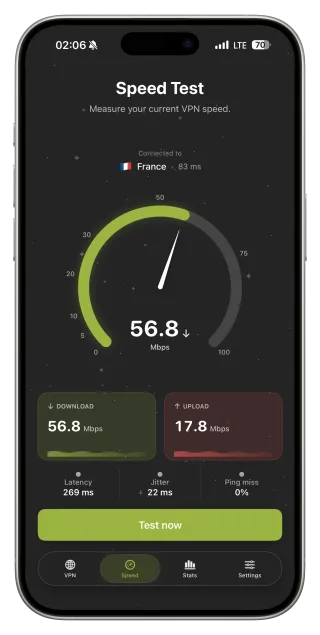
Server distance matters most
Every extra thousand kilometres adds latency. A server on another continent can turn a fast connection into a sluggish one. Use Optimal location, or pick the nearest server with the lowest ping in the list. Only choose distant servers when you need that specific region.
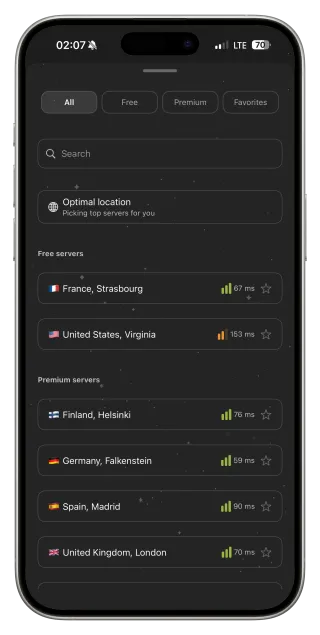
Try a different protocol
On stable networks WireGuard is usually fastest. If the network throttles VPN traffic, WireGuard may crawl while AmneziaWG, Hysteria2 or VLESS Reality perform better. Smart Connect does this automatically; to compare manually, switch protocol in Settings and test again on the same server.
Busy times and busy networks
Evening hours in hotels, trains and airports mean shared bandwidth. Weak cellular signal also limits speed regardless of VPN. If a test shows high packet loss, the radio link is the issue — move closer to the router or a window, or switch between Wi‑Fi and LTE.
Calls and games: watch jitter
For video calls and online games, latency and jitter matter more than download speed. A 200 Mbps connection with high jitter will still stutter. Choose the closest server and prefer WireGuard on stable networks.
When turning the VPN off is the answer
On a weak LTE signal or a trusted home network, sometimes the fastest option is no VPN. That is physics: encryption and the detour through a server always cost something. Auto-connect Wi‑Fi Only gives you protection on hotspots without affecting mobile data.
Speed troubleshooting in order
- Run a speed test without the VPN for a baseline.
- Connect and run FollowNet Speed Test on the same network.
- Switch to Optimal location or the nearest low-ping server.
- Compare WireGuard with Smart Connect on the same server.
- If loss is high, improve the signal or switch between Wi‑Fi and LTE.
- Test again at a quieter time if the network is congested.
What the numbers tell you
| Result | Meaning | Action |
|---|---|---|
| Baseline already slow | Network is the bottleneck | Change network or wait |
| High latency only with VPN | Server too far away | Pick a closer server |
| Download drops sharply with VPN | Protocol throttled | Try Smart or another protocol |
| High jitter or loss | Unstable radio link | Improve signal, switch Wi‑Fi/LTE |
Key points
- Always compare against a baseline without the VPN
- Server distance is the biggest factor
- Throttled networks favour AmneziaWG, Hysteria2 or VLESS Reality
- Jitter matters more than Mbps for calls and games
- Some overhead is normal and unavoidable
FAQ
How much slower should a VPN be?
With a nearby server, often only a little. Distant servers and congested networks increase the difference.
Is Premium faster than Free?
Encryption is the same. Premium gives access to more locations, which can mean a closer or less busy server.
Does Speed Test use my traffic?
Yes, it downloads and uploads data. On Free, avoid running it repeatedly.
Why is the VPN fast at home but slow in the café?
The café network is slower or throttles VPN traffic. Try Smart Connect and a nearby server.