
Guide
VPN for banking apps on iPhone — safer public Wi‑Fi, not a replacement for bank security
Opening a bank app on café or hotel Wi‑Fi is exactly the situation where a VPN helps: it encrypts the path between your iPhone and the VPN server. But it does not replace Face ID, two-factor codes or the bank’s own fraud checks. Here is how to use them together without triggering extra security checks.
What a VPN adds for banking
Bank apps already use HTTPS and certificate checks. A VPN adds protection at the network level: on public Wi‑Fi the hotspot owner and other users see only an encrypted tunnel, not which bank or service you contact. It also reduces the risk from fake hotspots that imitate a café network name.
What a VPN cannot do
A VPN does not protect against phishing links, fake calls from "the bank" or someone who learned your one-time code. Never share codes and never install apps on request from a caller. Your bank’s security features and your own caution remain the main defence.
Why a bank may ask for extra verification
Banks watch for unusual sign-ins. A login from an unfamiliar country or data centre may trigger an SMS code or a temporary block. Choose a server in your own country or the nearest location — it looks like normal usage and keeps latency low.
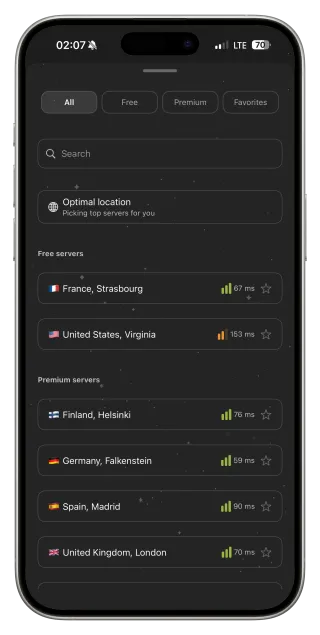
If the bank app refuses to work with the VPN
Some banks restrict VPN connections in their apps. In that case follow the bank’s policy: disconnect FollowNet, switch to mobile data instead of public Wi‑Fi and complete the operation. We do not help bypass bank security checks.
Safe routine on public Wi‑Fi
Turn on Auto-connect Wi‑Fi Only so the tunnel is already up when you join a hotspot. Wait for the connected status, then open the bank app and unlock it with Face ID. Avoid confirming large payments on unknown networks when mobile data is available.
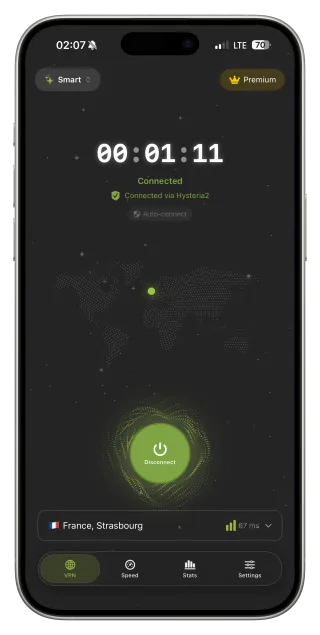
Banking on public Wi‑Fi step by step
- Enable Auto-connect Wi‑Fi Only in FollowNet.
- Select Optimal location or a server in your country.
- Join the Wi‑Fi and wait for Connected.
- Open the bank app and unlock with Face ID.
- If the bank blocks the VPN, disconnect and use mobile data.
Who protects what
| Threat | VPN | Bank / you |
|---|---|---|
| Snooping on public Wi‑Fi | Encrypts the tunnel | — |
| Fake hotspot | Reduces risk | Check the network name |
| Phishing link or call | No | Never share codes |
| Stolen password | No | Face ID, 2FA, bank alerts |
Key points
- A VPN protects the network path on public Wi‑Fi
- Choose a server in your country to avoid extra checks
- Face ID and two-factor codes remain essential
- Follow the bank’s policy if it restricts VPNs
- Prefer mobile data for large payments on unknown networks
FAQ
Is it safe to use a bank app with a VPN?
Yes, with a reputable VPN it adds protection on public networks. Choose a server in your country to avoid extra checks.
Why did my bank block the login?
An unfamiliar location can look suspicious. Use a nearby server or disconnect and log in over mobile data.
Does a VPN protect against phishing?
No. Phishing tricks you, not the network. Never share one-time codes.
Do I need a VPN for banking at home?
On your own secured Wi‑Fi it is optional. It matters most on public and shared networks.