
Guide
Airport Wi‑Fi and VPN: staying private while you travel
Airport Wi‑Fi is free, crowded and full of look-alike networks. A VPN keeps your traffic encrypted while you wait for your flight. Here is how to connect safely, what to expect from speed and how to make the most of a limited Free allowance.
Risks specific to airports
Thousands of people share the same hotspots, and it is easy to create a fake network with an official-sounding name. Before connecting, check the official network name on airport signs. Once connected, a VPN encrypts your traffic so neither the network nor other passengers can see what you do.
Connect in the right order
Airport networks almost always have a login page. Join the network, complete the page (sometimes it asks for an email or shows an advert), check that a normal site loads, and only then tap Connect in FollowNet. With Auto-connect set to Wi‑Fi Only, the VPN will start by itself once the portal is done.
Expect congestion
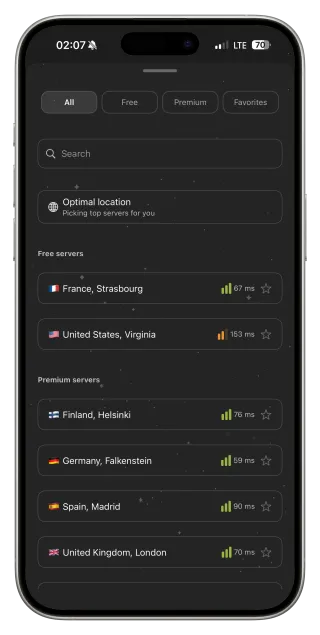
At peak times airport Wi‑Fi can be very slow. Choose a nearby server or Optimal location, and run Speed Test before a large download. If the Wi‑Fi is unusable, switch to mobile data — FollowNet works on LTE too, and Auto-connect Always keeps it on across both.
Making a Free allowance last
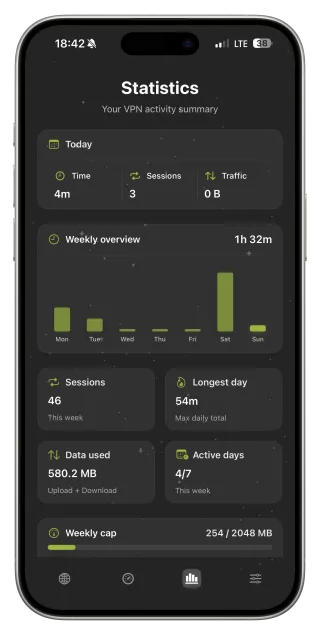
Video streaming uses the weekly allowance fastest. Download films and music at home before you travel, keep the VPN for messaging, email, banking and browsing at the gate, and skip unnecessary speed tests. Check the remaining traffic on the Statistics screen; Premium removes the limit if you travel often.
Roaming and arrival
After landing, you may be on a foreign SIM or roaming. Keep Smart Connect on: some networks abroad handle VPN traffic differently, and Smart Connect falls back to a protocol that works. The Travel profile uses IKEv2, which copes well with switching between airport Wi‑Fi and cellular.
Before and at the airport
- At home: install FollowNet, sign in and download offline content.
- Set Auto-connect to Wi‑Fi Only or apply the Travel profile.
- At the airport: confirm the official Wi‑Fi name on signs.
- Join it and complete the login page.
- Let FollowNet connect, then browse, message and work as usual.
Key points
- Verify the official network name — fake hotspots exist
- Finish the login page, then connect the VPN
- Choose a nearby server; airports are congested
- Download videos before you go to save Free traffic
- Travel profile and Smart Connect help on foreign networks
FAQ
Is airport Wi‑Fi dangerous?
It is shared with many strangers and easy to imitate. Using the official network plus a VPN removes most of the risk for everyday use.
Should I use airport Wi‑Fi or mobile data?
Mobile data is usually safer and sometimes faster. If you use Wi‑Fi, keep the VPN on.
Why is the VPN slow at the airport?
The Wi‑Fi itself is usually congested. A nearby server helps; the VPN cannot add bandwidth.
Does FollowNet work abroad?
Yes, subject to local laws. Smart Connect adapts to different network conditions.