
Guide
Captive portals and VPN on iPhone: hotel, airport and train Wi‑Fi
A captive portal is the login page some Wi‑Fi networks show before letting you online. It is the most common reason a VPN “does not work” on public Wi‑Fi. Here is why, and the simple order of steps that avoids the problem.
What a captive portal is
Hotels, airports, trains, cafés and conference venues often intercept your first web request and show a page: enter a room number, accept terms, watch an advert or type an email. Until you complete it, the network blocks normal internet access. iOS usually detects this and opens a small login sheet automatically.
Why it conflicts with a VPN
A VPN wants to send everything through an encrypted tunnel to its server. But before you complete the portal, the network blocks that connection. The result looks like a VPN that will not connect, or connects but loads nothing. Nothing is broken — the network simply has not let you in yet.
The right order
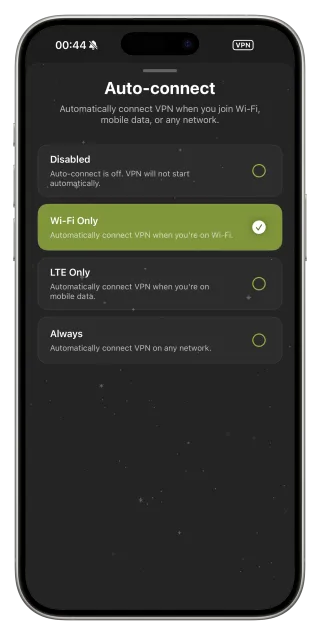
Join the network with the VPN off, complete the portal in the iOS sheet or in Safari, confirm a regular website loads, and then connect FollowNet. If you use Auto-connect on Wi‑Fi, it will start the VPN once the network is usable.
When the portal does not appear
Sometimes iOS does not open the login sheet. Open Safari and go to a plain http address (for example neverssl.com) — the network will redirect you to the portal. If you already had the VPN running, disconnect it first.
Portals that log you out
Many networks require you to sign in again after a few hours or every day. If the VPN suddenly stops passing traffic in a hotel, check whether the portal is back. Sign in again and reconnect. This is the network’s policy, not a VPN outage.
Saving time on networks you revisit
For a hotel or train operator you use often, save a custom Network Profile with the protocol, DNS and server that work there. After the portal, apply it with one tap.
Captive portal routine
- Make sure FollowNet is disconnected.
- Join the Wi‑Fi network.
- Complete the login page (iOS sheet or Safari).
- Open any normal website to confirm access.
- Connect FollowNet or let Auto-connect do it.
- If traffic stops later, check whether the portal needs a new login.
Key points
- Portals must be completed before the VPN can connect
- Connect the VPN only after a normal site loads
- Use neverssl.com to trigger a hidden portal
- Some networks require logging in again every day
- Save a profile for networks you use often
FAQ
Why does the login page not show up?
The VPN or a cached connection may be blocking it. Disconnect the VPN and open a plain http site in Safari.
Is the portal page itself safe?
It travels before the VPN is up, so avoid entering anything sensitive besides what the network asks for.
Can FollowNet connect automatically after the portal?
Yes, with Auto-connect on Wi‑Fi Only or Always it starts once the network allows traffic.
The VPN worked yesterday in this hotel, why not today?
The portal probably expired. Sign in again, then reconnect.