
Guide
Using a VPN on hotel Wi‑Fi with your iPhone
Hotel Wi‑Fi is shared, often old, and usually sits behind a login page. That makes it one of the best places to use a VPN — and one of the most frustrating if you connect in the wrong order. Here is the routine that works.
Why hotel networks deserve a VPN
Every guest shares the same network, equipment is rarely updated, and you have no idea who manages it. Some hotels also log traffic or inject pages. A VPN encrypts everything between your iPhone and the VPN server, so neither other guests nor the network operator can see which services you use.
Login page first, VPN second
Most hotels use a captive portal — the page where you enter your room number or accept terms. It needs a direct connection. If the VPN is already running, the page may not load and the tunnel cannot reach the internet. Join the Wi‑Fi, finish the portal in Safari, check that a normal site opens, then connect FollowNet.
Pick the right settings
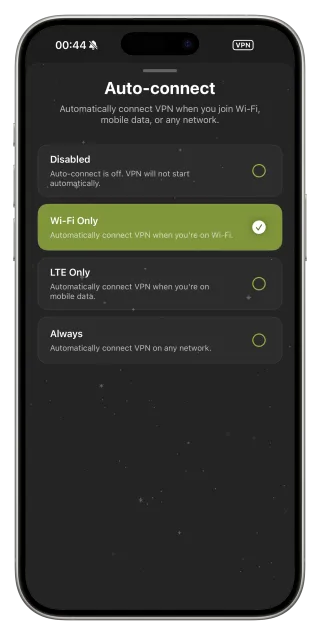
On calm hotel networks the Public Wi‑Fi profile is ideal: WireGuard for speed, Quad9 DNS and Auto-connect on Wi‑Fi. Some hotels throttle or block VPN traffic; then switch to the Restricted profile, which keeps Smart Connect on and lets it fall back to AmneziaWG, Hysteria2 or VLESS Reality.
Check the speed honestly
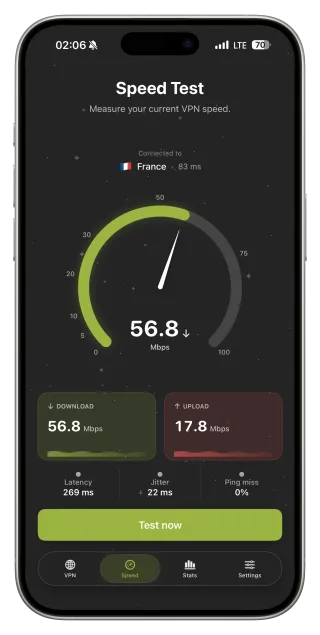
Hotel uplinks are often slow in the evening when everyone streams. Run Speed Test without and with the VPN on the same network. If the difference is large, pick a closer server or let Optimal location choose. The VPN cannot add bandwidth the hotel does not have.
Save what works
Hotel chains often use the same network setup in every property. When you find a combination that works — protocol, DNS and server — save it as a custom Network Profile and name it after the chain. Next time, apply it with one tap.
When the connection keeps dropping
Some portals log you out every few hours or every day. When the VPN suddenly stops passing traffic, disconnect, open Safari to see whether the login page is back, sign in again and reconnect. That is the hotel’s policy, not a VPN fault.
Hotel Wi‑Fi routine
- Join the hotel Wi‑Fi and complete the login page in Safari.
- Open any normal site to confirm the internet works.
- Connect FollowNet with the Public Wi‑Fi or Smart profile.
- If it will not connect or pages hang, switch to the Restricted profile.
- Run Speed Test, and pick a closer server if needed.
- Save the working setup as a custom profile for this hotel chain.
Key points
- Shared hotel networks are a prime case for a VPN
- Always finish the login page before connecting
- Public Wi‑Fi profile for calm networks, Restricted for difficult ones
- Speed Test reveals whether the hotel or the server is the bottleneck
- Save a working profile per hotel chain
FAQ
Why does the hotel login page not open with the VPN on?
The portal needs a direct connection. Disconnect, finish the login, then reconnect.
Is hotel Wi‑Fi with a password safe?
A shared password protects you from outsiders, not from other guests or the operator. A VPN adds that missing layer.
Will a VPN fix slow hotel Wi‑Fi?
No. It can sometimes help if the hotel throttles specific services, but it cannot add bandwidth.
Is Free enough for a hotel stay?
For browsing, messaging and email, usually yes. Evening streaming can use the weekly allowance quickly; Premium is unlimited.