
Guide
VPN for students on iPhone — campus Wi‑Fi, dorms and a budget-friendly plan
Students spend most of the day on shared networks: campus Wi‑Fi, dorms, libraries and cafés. A VPN encrypts that traffic on the way to the server. This guide covers when it is worth using, how to start with Free and how to stay within your school’s rules.
Why shared networks are the main risk
Campus and dorm networks connect hundreds of devices you do not know. Most traffic is already HTTPS, but a VPN adds another layer: the local network sees only an encrypted connection to the VPN server, not which services you use. This matters most on open library and café hotspots without a password.
Start with Free
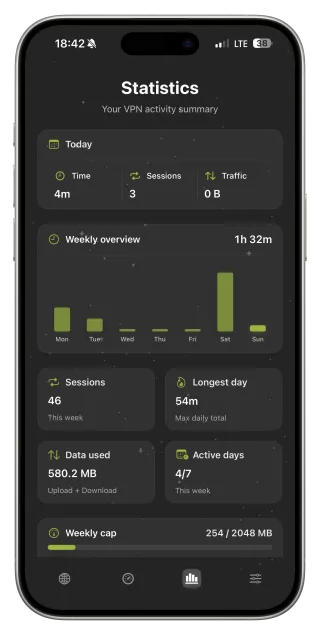
FollowNet Free includes a weekly traffic allowance — enough for messengers, email, banking and occasional browsing on public Wi‑Fi. The meter in the app shows how much is left and when the week resets. For lectures, large downloads and video, use trusted networks or consider Premium.
When campus Wi‑Fi interferes with VPNs
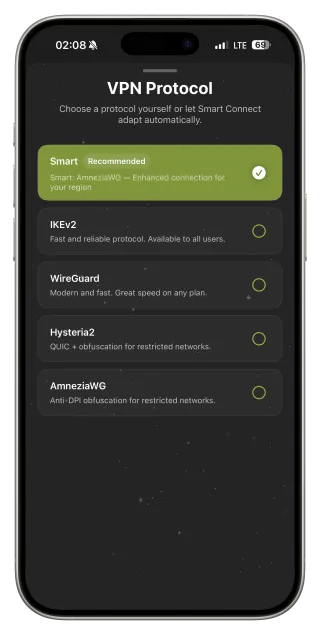
Some institutional networks filter VPN protocols. Leave Protocol on Smart: Smart Connect tries different protocols and keeps the one that actually passes traffic. If the network still blocks the tunnel, respect that — it is the network owner’s policy, and mobile data remains an option.
Share Premium wisely
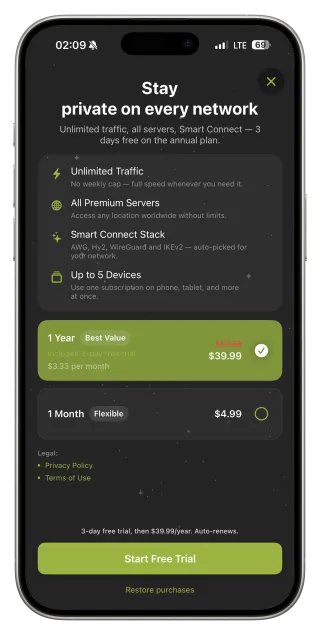
One Premium account works on up to five devices, including iPhone, iPad and the Chrome extension. Roommates sometimes split a plan, but devices on one account share it — keep it to people you trust and remove devices you no longer use.
Rules still apply
A VPN does not change your school’s acceptable-use policy. Do not use it to reach systems you are not allowed to access, and never during exams where it is prohibited. A VPN protects your connection; it is not a tool for getting around academic rules.
Before travelling home or on exchange
Install and test FollowNet before you leave. Abroad, hotel and hostel Wi‑Fi are typical places where the Travel profile and Auto-connect Wi‑Fi Only help. Check that you know how to switch protocols if one network behaves strangely.
Student setup
- Install FollowNet and sign in with your email code.
- Turn on Auto-connect Wi‑Fi Only for campus and café hotspots.
- Leave Protocol on Smart.
- Watch the weekly meter if you are on Free.
- Read your school’s network policy once.
Where a VPN helps on campus
| Place | Risk | Recommendation |
|---|---|---|
| Open library or café Wi‑Fi | High | Always connect |
| Dorm network | Medium | Auto-connect Wi‑Fi Only |
| Campus Wi‑Fi with login | Medium | Connect after signing in |
| Mobile data | Low | Optional |
Key points
- Shared networks are the main reason to use a VPN on campus
- Free weekly traffic covers everyday messaging and browsing
- Smart Connect handles networks that interfere with VPNs
- Premium covers up to five devices on one account
- School network rules still apply
FAQ
Is Free enough for a student?
For messengers, email and browsing on public Wi‑Fi — usually yes. Video and big downloads use the weekly allowance quickly.
Is it legal to use a VPN on campus?
Using a VPN is generally legal, but the network owner sets rules for its network. Follow your school’s policy.
Can I share Premium with roommates?
One account works on up to five devices. Share only with people you trust, since they use the same account.
Why does the VPN not connect on campus Wi‑Fi?
Some networks filter VPN protocols. Try Smart Connect; if it is still blocked, that is the network policy.